

Best Value Available! 2026 Realistic Verified Free SOL-C01 Exam Questions
Pass Your Exam Easily! SOL-C01 Real Question Answers Updated
NEW QUESTION # 91
What is the default Time Travel data retention period?
- A. 7 days
- B. 90 days
- C. 1 day
- D. 45 days
Answer: C
Explanation:
The default Time Travel retention period for most objects in Snowflake is1 day(24 hours). Time Travel enables access to historical versions of data after updates, deletes, or drops. It also allows cloning databases, schemas, and tables at previous points in time, and recovering dropped objects.
While Snowflake Enterprise Edition and higher tiers allow retention periods up to 90 days, this extended window is not the default-administrators must explicitly configure it for each table, schema, or database.
Retention periods of 7, 45, or 90 days are possible only with higher service editions; the default for all accounts and objects remains 1 day unless explicitly overridden.
NEW QUESTION # 92
You are using a Snowflake Notebook to perform data analysis on a large dataset. As part of your analysis, you need to create a custom Python function that calculates a complex metric based on multiple columns in a Snowflake table.
You want to apply this function to each row of the table and store the results in a new column.
Which of the following approaches is the MOST efficient and scalable way to achieve this using Snowflake and Python?
- A. Load the entire Snowflake table into a Pandas DataFrame, apply the Python function to each row using 'DataFrame.apply()', and then write the modified DataFrame back to Snowflake.
- B. Iterate over the rows of the Snowflake table using the Snowflake Connector for Python, call the Python function for each row, and then use "INSERT statements to insert the calculated values into a new table.
- C. Create a Snowflake Python User-Defined Function (UDF) that encapsulates the calculation logic and then use it in a 'SELECT statement to create a new column with the calculated values. Store the result in a new table using 'CREATE TABLE AS SELECT
- D. Create a stored procedure in Snowflake that runs the logic in a separate environment.
- E. Use the '%%osql' magic command to execute a series of SQL UPDATE' statements that call the Python function using a IJDF.
Answer: C
Explanation:
Option C, creating a Snowflake Python IJDF and using it in a `SELECT statement within a
`CREATE TABLE AS SELECT statement, is the most efficient and scalable approach. Snowflake IJDFs allow you to execute Python code directly within the Snowflake engine, leveraging Snowflake's distributed processing capabilities. This avoids the overhead of transferring large amounts of data between Snowflake and the Python environment in the Notebook. Loading the entire table into a Pandas DataFrame (A) is not scalable for large datasets and can lead to memory issues. Using `%%osql' with `UPDATE statements (B) would be very slow due to the row-by-row updates. Iterating over rows using the Snowflake Connector (D) is also inefficient and not scalable. Option E is incorrect because it doesn't directly use Python code from the Notebook.
NEW QUESTION # 93
You are tasked with loading data from a Parquet file into a Snowflake table. The Parquet file contains a column with a timestamp datatype. However, the timestamp values are being incorrectly loaded into Snowflake due to a mismatch in the expected timestamp format. Which approach should you take to address this issue?
- A. Use the 'TIMESTAMP_FORMAT option within the 'COPY INTO' command with the appropriate format string.
- B. Set the 'TIME ZONE parameter at the session level before running the 'COPY INTO* command.
- C. Update the Snowflake table column datatype to TEXT and then CAST the values.
- D. Modify the Parquet file to align with the default Snowflake timestamp format.
- E. Create a view on top of the Parquet file and apply a 'TO_TIMESTAMP' function with the correct format.
Answer: A
Explanation:
Option B is the most direct and efficient way to handle timestamp format discrepancies. By specifying the 'TIMESTAMP_FORMAT option within the 'COPY INTO' command, you can instruct Snowflake to parse the timestamp values in the Parquet file using the correct format string.
Option A is less practical as modifying the Parquet file might not always be feasible. Option C is also incorrect because Parquet files cannot be created on views. Option D addresses time zone issues, not format discrepancies. Option E will load them as text, which is not desirable.
NEW QUESTION # 94
A data engineer is tasked with creating multiple schemas within a Snowflake database called
'SALES DB'. These schemas need to be isolated from each other to prevent accidental data access. Which of the following approaches is the MOST secure and efficient way to achieve this?
- A. Create separate schemas within 'SALES_DB' and grant specific privileges on each schema to appropriate roles.
- B. Create a separate database for each schema, leading to multiple databases instead of schemas within 'SALES_DB'.
- C. Create all schemas under the 'PUBLIC' schema of 'SALES_DB' and grant specific privileges on each table.
- D. Create one large schema and prefix all table names with the schema name to simulate schema separation.
- E. Creating external tables and configuring different storage integrations for each table.
Answer: A
Explanation:
Creating separate schemas within the database and assigning granular privileges provides the most secure and manageable separation. Option A is less secure. Option B is inefficient and overcomplicates the setup. Option D lacks proper schema isolation and management. Option E applies to external tables, which are not the focus of internal schema segregation.
NEW QUESTION # 95
A data engineer is using the Snowflake web UI to execute a complex SQL query involving multiple joins and aggregations. The query is running slower than expected. What are the most efficient steps the data engineer can take directly within the Snowflake web UI to diagnose and potentially improve the query performance?
- A. Enable caching for the query result by setting the parameter to TRUE in the worksheet.
- B. Review the Query History page in the web UI to analyze query statistics (e.g., execution time, bytes scanned) for previous executions of similar queries.
- C. Download the query execution plan as a JSON file for offline analysis using external tools.
- D. Increase the warehouse size using the drop-down menu in the worksheet and rerun the query.
- E. Use the 'Profile' option in the worksheet to examine the query execution plan and identify bottlenecks.
Answer: B,D,E
Explanation:
The most efficient steps include profiling the query directly in the UI to identify bottlenecks (A), resizing the warehouse for more resources (B), and analyzing the Query History for insights from previous executions (E). Option C is not available directly in the worksheet. While downloading the execution plan (D) is helpful, it's not the most efficient initial step. Increasing Warehouse and query profiling directly address the performance within Snowflake.
NEW QUESTION # 96
When loading data into a table using the COPY INTO command, what is the default error-handling setting?
- A. SKIP_FILE
- B. CONTINUE
- C. ABORT_STATEMENT
- D. VALIDATE
Answer: C
Explanation:
By default, Snowflake usesON_ERROR = ABORT_STATEMENTfor COPY INTO. This means that if a single row fails to load due to issues such as type mismatches or malformed data, Snowflake immediately stops the entire load operation. This behavior ensures data integrity by preventing partial or incomplete loads when errors occur.
Other error-handling modes must be explicitly specified: CONTINUE skips erroneous rows, SKIP_FILE skips whole files with errors, and VALIDATE is part of the validation mode feature, not a default COPY behavior.
Thus, unless explicitly changed, COPY INTO always uses ABORT_STATEMENT.
NEW QUESTION # 97
You are tasked with classifying a large dataset of customer support tickets using Snowflake Cortex's CLASSIFY TEXT function. You need to ensure optimal performance and cost- effectiveness. Which of the following strategies would be MOST effective?
- A. Use a very large warehouse (e.g., X-LARGE) to execute the CLASSIFY _ TEXT function, regardless of the data volume. Larger warehouses always provide faster processing.
- B. Load all customer support tickets into a single very wide row and classify that single row using CLASSIFY _ TEXT. This minimizes the number of rows processed.
- C. Disable auto-suspension on your warehouse to keep it running continuously while classifying the data. This will prevent any potential startup delays.
- D. Profile the execution time of CLASSIFY _ TEXT with different warehouse sizes and choose the smallest warehouse that meets your performance requirements. Store the results in a materialized view.
- E. Increase the parameter to a very high value to prevent query failures due to the long processing time of CLASSIFY TEXT.
Answer: D
Explanation:
Option C is the most sensible approach. Profiling with different warehouse sizes allows you to determine the optimal balance between performance and cost. Using a materialized view ensures that the classification is only performed once, and subsequent queries are faster. Option A is wasteful, as a very large warehouse may not be necessary. Option B addresses timeout issues but doesn't optimize performance or cost. Option D is also wasteful and can lead to unnecessary costs. Option E is illogical as CLASSIFY _ TEXT is applied to text and not a representation of the entire dataset in a single row.
NEW QUESTION # 98
What does "warehouse scaling in/out" refer to in Snowflake?
- A. Changing the region of the warehouse.
- B. Changing the size of the warehouse (e.g., from Small to Medium or vice versa).
- C. Adjusting the number of clusters in a multi-cluster warehouse.
- D. Moving data between different storage locations.
Answer: C
Explanation:
Scalingin/outin Snowflake refers to modifying thenumber of compute clustersassociated with a multi-cluster virtual warehouse. Scalingoutincreases cluster count to accommodate higher concurrency or workload spikes, allowing more queries to run simultaneously without queuing. Scalinginreduces cluster count during periods of lower demand, optimizing compute usage and costs. This is distinct fromscaling up/down, which refers to changing warehouse size (e.g., Small, Medium). Scaling does not involve data movement or region changes; warehouse compute is stateless and operates independently of storage. Multi-cluster warehouses allow Snowflake to automatically add or remove clusters based on demand when auto-scale policies are configured.
NEW QUESTION # 99
You have a Snowflake virtual warehouse named 'REPORTING that is consistently experiencing performance issues during peak hours. You suspect that resource contention is the primary cause. Which of the following actions, when performed together , would be the MOST effective in mitigating these performance issues and ensuring consistent query performance for reporting?
- A. Increase the size of from Small to Medium and enable auto-suspend after 5 minutes of inactivity.
- B. Enable multi-cluster warehouse for 'REPORTING with a minimum of 2 clusters and a maximum of
4 clusters. Set the scaling policy to 'Economy'. - C. Enable auto-suspend after 5 minutes of inactivity and implement query tagging to identify long- running queries.
- D. Enable multi-cluster warehouse for with a minimum of 2 clusters and a maximum of 4 clusters. Set the scaling policy to 'Standard'. Increase the size of the warehouse to Large.
- E. Monitor warehouse load using Snowsight and manually increase the warehouse size when performance degrades.
Answer: D
Explanation:
Option C is the most effective solution. Enabling a multi-cluster warehouse allows Snowflake to automatically scale out by adding more compute resources when the load increases. Setting the scaling policy to 'Standard' prioritizes performance over cost, ensuring that new clusters are started quickly when needed. Increasing the warehouse size to 'Large' provides more resources to each individual cluster. Option A only increases the warehouse size but doesn't address concurrency. Option B uses the 'Economy' scaling policy, which might delay the creation of new clusters, thus not solving the performance issue. Option D only addresses inactivity and identifies long-running queries but doesn't resolve the resource contention. Option E relies on manual intervention, which is not ideal for consistently addressing peak hour performance issues.
NEW QUESTION # 100
A global e-commerce company stores product descriptions in various languages in a Snowflake table called 'PRODUCT DESCRIPTIONS. The table includes columns: `PRODUCT ID' ONT),
`LANGUAGE (VARCHAR), and 'DESCRIPTION' (VARCHAR). They need to create a procedure that dynamically translates all descriptions into English using Snowflake Cortex LLM's
'TRANSLATE' function and stores the translated descriptions in a new table 'PRODUCT DESCRIPTIONS EN'. The procedure should handle potential errors and log them to an error table called `TRANSLATION ERRORS. Which of the following code snippets BEST demonstrates how to implement this procedure, including error handling and logging? (Assume error logging table is already created and required privileges are granted)
- A.

- B.

- C.

- D.

- E.

Answer: C
Explanation:
Option B is the best approach because it iterates through each product description, translates it, and includes error handling using a 'BEGIN...EXCEPTION...END block. If an error occurs during the translation of a specific product description, it logs the error to the `TRANSLATION ERRORS table without stopping the entire procedure. Option A performs a bulk insert without error handling, which would cause the procedure to fail if any translation fails. Option C has incorrect syntax in referencing the resultset. Option D's TRY CATCH block is invalid syntax in snowflake procedure. The Snowflake Cortex. TRANSLATE function does not have parameter like error_on_unsupported_language.
NEW QUESTION # 101
Which of the following are key components of Snowflake's RBAC system? (Choose any 3 options)
- A. Users
- B. Privileges
- C. Roles
- D. Permissions
Answer: A,B,C
Explanation:
Snowflake's RBAC security model revolves aroundUsers,Roles, andPrivileges. Users represent individual identities or service accounts. Roles group privileges and are assigned to users. Privileges define specific actions that can be performed on objects (e.g., SELECT, INSERT, OWNERSHIP). "Permissions" is not a formal RBAC component-permissions are effectively the result of privileges assigned to roles. Therefore, the three core RBAC components are Users, Roles, and Privileges.
NEW QUESTION # 102
A data scientist wants to use the COMPLETE function in Snowflake Cortex to perform sentiment analysis on social media posts. They have a table named 'SOCIAL MEDIA POSTS with a column
'POST TEXT' containing the post content. They want to classify each post as either 'Positive',
'Negative', or 'Neutral'. Which of the following SQL statements is the MOST appropriate for this task?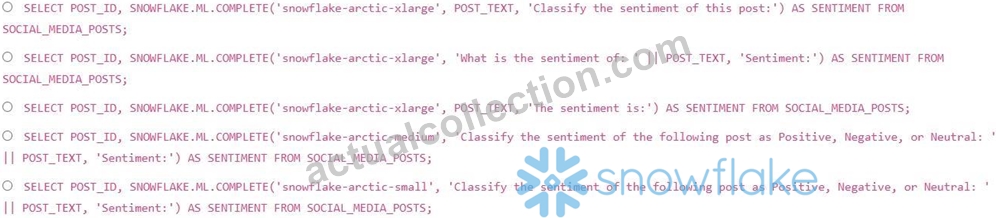
- A. Option C
- B. Option E
- C. Option B
- D. Option D
- E. Option A
Answer: B
Explanation:
Option E is the most appropriate. It explicitly instructs the COMPLETE function to classify the sentiment and provides the possible classifications (Positive', 'Negative', or 'Neutral'). Combining text with II and using smaller snowflake model to minimize compute cost.
NEW QUESTION # 103
What is the primary benefit of the Snowflake data cloud?
- A. It provides direct access to underlying infrastructure.
- B. It eliminates the need for data governance.
- C. It replaces traditional data warehouses with on-premises solutions.
- D. It enables organizations to unite and share their data.
Answer: D
Explanation:
The Snowflake Data Cloud allows organizations toseamlessly share, access, and collaborate on dataacross departments and external partners, without copying or moving data. Through secure data sharing, listings, and data clean rooms, Snowflake eliminates data silos and dramatically improves data collaboration.
It does not eliminate the need for governance-Snowflake enhances governance via RBAC, masking policies, and centralized controls. It does not provide access to underlying cloud infrastructure; Snowflake abstracts that. It is not an on-premises solution; Snowflake is fully cloud-native.
Thus, the primary benefit is unifying and securely sharing data across the ecosystem.
NEW QUESTION # 104
What are the benefits of using the Snowsight data loading interface? (Select TWO).
- A. It creates permanent file formats that can be used to load data in the future.
- B. It will try to detect data types.
- C. It allows a user to optimize data loading into a table.
- D. It lets a user merge file rows into the table records.
- E. It allows a user to insert the records of a supported file into a table.
Answer: B,E
Explanation:
Snowsight's file-loading interface:
*Automatically detects data typesby inspecting column values.
*Loads (inserts) file contents directly into a table, either a new table or an existing one.
Snowsight does not automatically create permanent file formats, does not merge rows, and does not optimize warehouse-level performance.
NEW QUESTION # 105
A data scientist needs to create a temporary table in Snowflake to perform some data analysis.
The table should only be accessible within their current session and should be automatically dropped at the end of the session. Which of the following SQL statements is the CORRECT way to create such a table?
- A. CREATE TEMP TABLE AS SELECT FROM existing_table;
- B. CREATE GLOBAL TEMPORARY TABLE AS SELECT FROM existing_table;
- C. CREATE VOLATILE TABLE AS SELECT FROM existing_table;
- D. CREATE TABLE AS SELECT FROM existing_table;
- E. CREATE LOCAL TEMPORARY TABLE AS SELECT FROM existing_table;
Answer: A
Explanation:
The 'CREATE TEMP TABLE statement is the correct way to create a temporary table in Snowflake that is only visible within the current session and is automatically dropped when the session ends. 'GLOBAL TEMPORARY TABLE' and 'LOCAL TEMPORARY TABLE' are not valid Snowflake syntax. 'CREATE TABLE without 'TEMP' creates a permanent table. 'VOLATILE applies to functions, not tables.
NEW QUESTION # 106
A Snowflake account has a virtual warehouse named `ANALYTICS WH' configured with multi- clustering. The MIN CLUSTER COUNT is set to 1, and the MAX CLUSTER COUNT is set to 3.
During a period of heavy query load, all three clusters are active. However, after the peak period, the query load decreases significantly. Which of the following statements are TRUE regarding the automatic scaling behavior of this virtual warehouse? (Select TWO)
- A. Snowflake will automatically suspend all clusters when the query load drops below a certain threshold.
- B. The time it takes for Snowflake to reduce the number of clusters depends on the `SCALING POLICY set for the warehouse. `ECONOMY' will scale down faster than 'STANDARD.
- C. Snowflake will automatically reduce the number of active clusters down to the MIN_CLUSTER_COUNT (1) when the query load decreases.
- D. Snowflake will maintain all three clusters indefinitely, regardless of the query load, until the administrator manually scales down the warehouse.
- E. Snowflake will immediately suspend all idle clusters to minimize credit consumption.
Answer: B,C
Explanation:
Snowflake automatically scales down the number of active clusters in a multi-cluster warehouse when the query load decreases, eventually reducing it to the MIN_CLUSTER_COUNT (1) (B).
The 'SCALING_POLICY determines how aggressively Snowflake scales the warehouse up and down. 'ECONOMY' scales down more aggressively than 'STANDARD' to minimize credit consumption (E). Snowflake will not suspend all clusters entirely if MIN_CLUSTER_COUNT is set to 1 . The clusters are not suspended immediately (C). (D) is incorrect as Snowflake does automatically scale down.
NEW QUESTION # 107
Which command is used to create a new virtual warehouse in Snowflake?
- A. CREATE WAREHOUSE warehouse_name;
- B. CREATE DATABASE warehouse_name;
- C. CREATE SCHEMA warehouse_name;
- D. CREATE VIRTUALWAREHOUSE warehouse_name;
Answer: A
Explanation:
Snowflake uses the SQL command CREATE WAREHOUSE warehouse_name to create a new virtual warehouse. Warehouses provide the compute resources for executing SQL queries, loading data, and performing transformations. When creating a warehouse, additional parameters may be specified, such as warehouse size, auto-suspend timeout, auto-resume, scaling policy, or multi-cluster mode. The options involving "CREATE VIRTUALWAREHOUSE" are invalid syntax in Snowflake. CREATE DATABASE and CREATE SCHEMA create storage containers, not compute resources. Therefore, CREATE WAREHOUSE is the only correct command for provisioning compute.
NEW QUESTION # 108
A Snowflake environment has two databases, 'DEV DB' and 'PROD DB'. A table 'EMPLOYEES' exists in both databases with identical schemas. A developer needs to create a view in 'DEV DB' that references the 'EMPLOYEES' table in 'PROD DB' to perform cross-database joins. Which of the following SQL statements will successfully create this view in 'DEV DB'?
- A. CREATE OR REPLACE VIEW DEV DB.PUBLIC.EMPLOYEE VIEW AS SELECT FROM PROD DB.PUBLIC.EMPLOYEES WITH SECURE;
- B. CREATE VIEW DEV DB.PUBLIC.EMPLOYEE VIEW AS SELECT FROM PROD
DB.PUBLIC.EMPLOYEES WITH READ ONLY; - C. CREATE OR REPLACE VIEW DEV DB.PUBLIC.EMPLOYEE VIEW AS SELECT FROM PROD DB.PUBLIC.EMPLOYEES;
- D. CREATE SECURE VIEW DEV DB.PUBLIC.EMPLOYEE VIEW AS SELECT FROM PRODDB.PUBLIC.EMPLOYEES;
- E. CREATE VIEW DEV DB.PUBLIC.EMPLOYEE VIEW AS SELECT FROM PROD
DB.PUBLIC.EMPLOYEES;
Answer: C,D
Explanation:
To create a view that references objects in other databases, you should fully qualify the object names in the 'SELECT statement. Both options create the view referencing the PROD DB. Option C uses `CREATE OR REPLACE VIEW and option E uses `CREATE SECURE VIEW' which are correct and commonly used options for this scenerio. 'WITH READ ONLY' is not a supported clause for creating views in Snowflake. 'CREATE SECURE VIEW' creates a secure view which is recommended to protect the underlying objects' definition.
NEW QUESTION # 109
You are designing a data warehouse in Snowflake and need to implement a role-based access control (RBAC) system. You have the following requirements: A 'DATA ENGINEER role that can create and manage tables, views, and other objects in the 'RAW DATA' schema. A 'DATA ANALYST role that can query data from tables and views in the 'RAW DATA' schema and create temporary tables for their analysis. Neither role should be able to drop tables owned by the other role. Which set of SQL statements will correctly implement the desired RBAC system? (Select two that apply.)
- A.

- B.

- C.

- D.

- E.

Answer: A,B
Explanation:
Options A and B are correct because they grant the necessary privileges to the
'DATA_ENGINEER and "DATA_ANALYST roles. Option A uses FUTURE grants to the DATA ANALYST role; any new tables created will grant select permissions automatically. Option B explicitly grants SELECT on ALL TABLES, meaning it's a one-time grant. Option C grants ownership, which allows the to drop tables created by other roles. Option D grants ALL PRIVILEGES, which allows the 'DATA ENGINEER to drop tables created by other roles. Option E grants create temporary table on SCHEMA, it has to be on DATABASE.
NEW QUESTION # 110
What is the purpose of Time Travel?
- A. To ensure that users' data can be recovered at any time
- B. To automatically manage timestamp data types
- C. To facilitate the loading of historical data into Snowflake
- D. To allow users to access historical data
Answer: D
Explanation:
Time Travel enables Snowflake users to query, clone, or restore historical versions of data. This includes retrieving previous states of tables, schemas, or databases-even after updates, deletes, or drops. Time Travel operates within a retention period (default: 1 day, up to 90 days on higher editions).
Users can query historical data using the AS OF or BEFORE clause, restore dropped objects, and clone databases at specific points in time for backup or analysis.
Time Travel doesnotautomatically manage timestamp data types. It does not guarantee indefinite recovery- after the retention window expires, data moves into Fail-safe. It also is not primarily designed for loading historical datasets; its purpose is to access past states of Snowflake-managed data.
Thus, the correct purpose is to enable access to historical data inside Snowflake.
NEW QUESTION # 111
When querying semi-structured data in Snowflake, which function extracts a specific field from a JSON document?
- A. GET_PATH()
- B. PARSE_JSON()
- C. EXTRACT_JSON()
- D. SELECT_FIELD()
Answer: B
NEW QUESTION # 112
Your team is loading data into Snowflake using Snowpipe. You've noticed that data loading is significantly slower than expected, even though your virtual warehouse is sized appropriately.
Which of the following factors could contribute to this performance bottleneck? (Select TWO)
- A. The virtual warehouse is configured with auto-suspend, causing it to frequently start and stop.
- B. The Snowflake table has a clustering key that is poorly chosen, resulting in uneven data distribution.
- C. The IAM role used for accessing data in S3 has insufficient permissions.
- D. Snowpipe is configured to use the COPY INTO statement directly, bypassing the Snowpipe service.
- E. The files being loaded are very small (e.g., less than 1 MB) and numerous.
Answer: A,E
Explanation:
Frequent auto-suspension of the virtual warehouse (A) will introduce latency as the warehouse needs to start up each time data is available. Loading many small files (B) can also create a bottleneck because of the overhead associated with processing each file. A poorly chosen clustering key (C) impacts query performance, not Snowpipe loading directly. Snowpipe uses COPY INTO implicitly; (D) is contradictory. Insufficient IAM permissions (E) would prevent data loading altogether, not just slow it down.
NEW QUESTION # 113
What is the purpose of the USE SCHEMA command in Snowflake?
- A. To modify the schema structure in a session
- B. To create a new schema in a database
- C. To take ownership of an existing schema
- D. To set the current schema for a session
Answer: D
Explanation:
The USE SCHEMA command sets the active schema context for the current session. After it is executed, any unqualified object names (for example, SELECT * FROM my_table) are resolved within that schema. This reduces the need to fully qualify object names with database and schema each time and ensures that statements reference the expected logical container.
CREATE SCHEMA is used to create a new schema. ALTER SCHEMA and GRANT OWNERSHIP are used to modify schema properties or transfer ownership, respectively. USE SCHEMA does not alter structure or ownership; it simply changes the context in which subsequent SQL statements are interpreted.
NEW QUESTION # 114
......
Snowflake SOL-C01 Exam Syllabus Topics:
| Topic | Details |
|---|---|
| Topic 1 |
|
| Topic 2 |
|
| Topic 3 |
|
| Topic 4 |
|
Actual Questions Answers Pass With Real SOL-C01 Exam Dumps: https://www.actualcollection.com/SOL-C01-exam-questions.html
SOL-C01 Dumps Prepare Your Exam With 218 Questions: https://drive.google.com/open?id=1XlAxSBFyTwygfQ2QNVrn0-wcM4TTjI7q