

[Jan 28, 2026] Fully Updated Free Actual Adobe AD0-E724 Exam Questions
Free AD0-E724 Questions for Adobe AD0-E724 Exam [Jan-2026]
NEW QUESTION # 86
An Adobe Commerce developer adds a new extension attribute to add an array of values to the invoices that are fetched through the APIs.
After a while, their technical manager reviews their work and notices something wrong with the extension_attributes. xml file that the developer created in their module:
What is the problem with this xml snippet?
- A. The extension attribute references the wrong interface, it should have referenced the Magento\saies\Api\data\invoiceinterface.
- B. The type is wrong, string [] should be replaced with array.
- C. The extension attribute references the repository instead of the interface it implements (Magento\saies\Api\invoiceRepositorymterface).
Answer: A
Explanation:
When adding extension attributes in Adobe Commerce, it's essential to reference the correct interface in the extension_attributes.xml file. Extension attributes in Magento are used to add custom data fields to existing entities, and these should extend the core entity interfaces, not their repositories.
In this case:
* The developer needs to reference Magento\Sales\Api\Data\InvoiceInterface, which represents the data structure of invoices, rather than any repository or incorrect interfaces.
* The extension_attributes.xml should specify the data interface (e.g., Magento\Sales\Api\Data\InvoiceInterface) to ensure the extension attribute is correctly applied to the invoice entity and is accessible when fetching invoices through APIs.
Correct XML format:
<?xml version="1.0"?>
<config
xmlns:xsi="http://www.w3.org/2001/XMLSchema-instance" xsi:noNamespaceSchemaLocation="urn:
magento:module:Magento_ExtensionAttributes:etc/extension_attributes.xsd"
>
<extension_attributes for="Magento\Sales\Api\Data\InvoiceInterface">
<attribute code="your_custom_attribute" type="string[]" />
</extension_attributes>
</config>
Additional Resources:
* Adobe Commerce Developer Guide: Using Extension Attributes
* Extension Attributes XML Reference
NEW QUESTION # 87
An Adobe Commerce developer is asked to change the tracking level on a custom module for free downloading of pdf and images.
The module contains following models:
Vendor\FreeDownload\Model\Download
Vendor\FreeDownload\Model\DownloadPdf extends Vendor\FreeDownload\Model\Download Vendor\FreeDownload\Model\DownloadImage extends Vendor\FreeDownload\Model\Download Download class has a parameter for tracking_level.
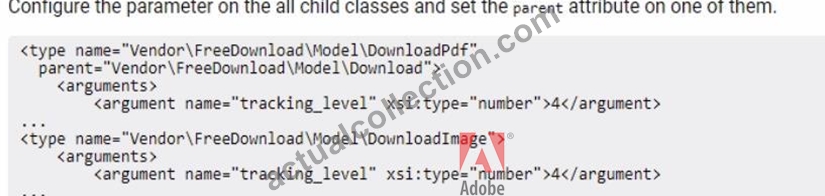
How will the developer configure the tracking_level parameter, in di.xml.to have a value of 4 for Download class and all classes that extend Download?
- A.
- B.

- C.

Answer: B
Explanation:
To configure a parameter for a parent class so that it propagates to all descendant classes, the correct approach is to define the parameter on the parent class within di.xml. This way, all child classes inheriting from this parent will automatically use the parameter value unless explicitly overridden.
Option C is correct for the following reasons:
* Configuring on the Parent Class (Vendor\FreeDownload\Model\Download):By setting the tracking_level parameter directly on the Download class, you ensure that all classes extending this class, such as DownloadPdf andDownloadImage, will inherit the tracking_level parameter value. This method leverages Magento's dependency injection configuration, which allows parameters set on a parent class to cascade to child classes.
* Explanation: In Magento's dependency injection system, parameters configured at the parent class level are available to all child classes unless overridden at a more specific level. Defining tracking_level in the parent class is efficient and ensures consistency across all subclasses.
NEW QUESTION # 88
A developer needs to extend the existing jQuery widget. Which jQuery function is used for this purpose?
- A. $.mage
- B. $.widget
- C. $.ui
Answer: B
Explanation:
To extend an existing jQuery widget in Adobe Commerce, the$.widgetfunction is used. This function is part of jQuery UI's widget factory and is a powerful tool for creating stateful plugins with a consistent API. It allows developers to create a new widget that inherits from an existing widget, enhancing or modifying its functionality, making option C the correct answer.
NEW QUESTION # 89
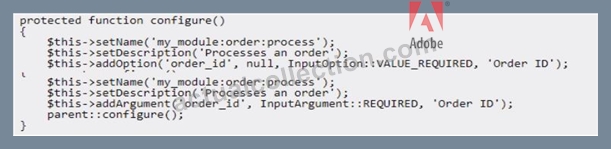
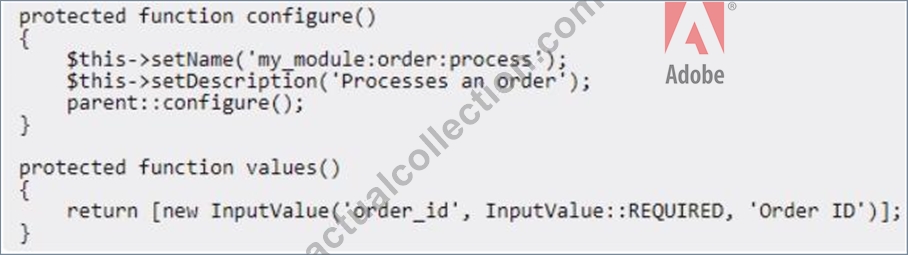
An Adobe Commerce developer has created a process that exports a given order to some external accounting system. Launching this process using the Magento CLI with the command php bin/magento my_module:
order: process --order_id=<order_id> is required.
Example: php bin/magento my_module:order:process --order_id=1245.
What is the correct way to configure the command?
- A.
- B.

- C.

- D.
Answer: C
Explanation:
To properly configure a Magento CLI command that includes a required argument, such as --order_id, which is mandatory for processing an order, the best approach is to use the addArgument method within the configure function. This method defines required arguments for the command, ensuring the user provides the necessary data.
Option D is correct for the following reasons:
* Using addArgument for Required Inputs:The addArgument method is used here to declare order_id as a required argument. This is more appropriate than addOption when the parameter is essential for command execution and should not be omitted. By specifying InputArgument::REQUIRED, the command ensures that the order_id must be provided by the user.
* Explanation: addArgument is ideal for required data that the command cannot function without, while addOption is typically used for optional parameters. order_id is essential to identify which order to process, making addArgument the suitable choice here.
NEW QUESTION # 90
Which CLI command should be used to determine that static content signing is enabled?
- A. bin/magento config:show dev/static/status
- B. bin/magento config:show dev/static/sign
- C. bin/magento config:show dev/static/sign/status
Answer: B
Explanation:
After a thorough search of the provided documents, I couldn't find a direct reference to the specific CLI command for determining if static content signing is enabled in Magento. However, the typical command for checking configuration settings in Magento isbin/magento config:show <path>, where<path>is the configuration path for the setting you wish to view. Based on Magento's configuration path patterns and the options provided, the most logical choice would beB. bin/magento config:show dev/static/sign, although this cannot be confirmed without further context or documentation.
NEW QUESTION # 91
For security reasons, merchant requested to a developer to change default admin url to a unique url for every branch/environment of their Adobe Commerce Cloud project.
Which CLI command would the developer use update the admin url?
- A. bin/magento adminuri:set <admin_uri>
- B. magento-cloud variable:set ADMIN_URL
- C. ece-tools variable:update ADMIN_URL
Answer: B
Explanation:
The CLI command that the developer would use to update the admin url is magento-cloud variable:set ADMIN_URL. This command sets an environment variable called ADMIN_URL with a custom value for the admin url on a specific environment. Environment variables are configuration settings that affect the behavior of the Adobe Commerce Cloud application and services. By setting an environment variable for ADMIN_URL, the developer can change the default admin urlto a unique url for every branch/environment of their Adobe Commerce Cloud project. Verified References: [Magento 2.4 DevDocs]
NEW QUESTION # 92
On an Adobe Commerce Cloud platform, at what level is the variable env: composer_auth located in the Project Web Interface?
- A. In the Integration variables.
- B. In the Project variables.
- C. In the Environment-specific variables.
Answer: B
Explanation:
The variable env: composer_auth is located in the Project variables section in the Project Web Interface. This variable is used to store the authentication credentials for Composer repositories that require access keys or tokens. The developer can set this variable at the project level to apply it to all environments, or override it at the environment level if needed. Verified References: [Magento 2.4 DevDocs] 2
NEW QUESTION # 93
Which Cloud CLI for Commerce command can be used to quickly view a specific log file for an Adobe Commerce Cloud project?
- A. magento-cloud log
- B. magento-cloud logs:show
- C. magento-cloud logs:list
Answer: B
Explanation:
The Cloud CLI for Commerce command that can be used to quickly view a specific log file for an Adobe Commerce Cloud project ismagento-cloud logs:show. This command allows developers to view log files directly from the command line, which is useful for debugging and monitoring the application's state without needing to access the file system directly.
NEW QUESTION # 94
When researching some issues with the indexer, an Adobe Commerce developer is seeing errors in the logs similar to Memory size allocated for the temporary table is more than 20% of innodb_buffer_pool_size. It is suggested that the client update innodb_buf f er_pool_size or decrease the batch size value.
Why does decreasing the batch size value improve performance?
- A. This decreases memory usage for the temporary table.
- B. This allows for more PHP threads to be utilized during the process.
- C. This allows for a longer timeout per batch process.
Answer: A
Explanation:
Decreasing the batch size value improves performance by reducing the memory usage for the temporary table.
The batch size value determines how many rows of data are processed at a time by the indexer. A large batch size value can cause the allocated memory size for the temporary table to exceed 20% of innodb_buffer_pool_size, which can result in errors and slow down the indexing process. By lowering the batch size value, the indexer can process the data more efficiently and avoid memory issues. Verified References: [Magento 2.4 DevDocs] [Magento Stack Exchange] The error message regarding innodb_buffer_pool_size indicates that the temporary table's memory usage is high. Decreasing the batch size value directly reduces the number of rows processed in each batch, which in turn reduces the memory requirements for the temporary table.
* Impact of Batch Size on Memory Usage:
* The batch size determines how many records are processed at one time. By lowering the batch size, fewer records are processed, which reduces the amount of temporary table memory needed, alleviating the pressure on the InnoDB buffer pool.
* When the memory required by temporary tables exceeds the InnoDB buffer pool limit, MySQL might swap to disk, leading to slower performance and increased I/O.
* Why Option A is Correct:
* Reducing the memory footprint of temporary tables helps to prevent situations where memory constraints slow down or disrupt indexer operations.
* Options B and C are incorrect as they do not directly impact memory usage. Batch size adjustments do not affect timeout settings or PHP thread usage.
* Recommendations:
* In addition to adjusting the batch size, consider optimizing the innodb_buffer_pool_size setting based on server capacity to better handle larger operations if needed.
NEW QUESTION # 95
The value of a product attribute in the Adobe Commerce system needs to have a different format before it is displayed. Which attribute model class is responsible for this?
- A. Backend
- B. Frontend
- C. Source
Answer: B
Explanation:
The frontend attribute model class is responsible for formatting the value of a product attribute before it is displayed on the storefront. This class can implement methods such as getValue, getLabel, getInputType, and getOptionText to modify the attribute value.
The backend attribute model class is responsible for saving and loading the attribute value to and from the database. The source attribute model class is responsible for providing the list of options for an attribute.
Verified References: [Adobe Commerce Developer Guide - Attribute models] In Adobe Commerce (Magento 2), the formatting of product attribute values before they are displayed is handled by the attribute's frontend model. The frontend model, typically extending
\Magento\Eav\Model\Entity\Attribute\Frontend\AbstractFrontend, is responsible for preparing the attribute value for display in the frontend, including formatting dates, adding pricing structures, and more.
The backend model deals with saving and loading attribute data, while the source model provides options for select attributes.
NEW QUESTION # 96
How are multiple EAV attributes belonging to the same entity grouped in the database?
- A. Based on the sizes of values they contain
- B. Based on all numeric values being stored in one table while text values are stored in the other
- C. Based on the types of values they contain
Answer: C
Explanation:
Multiple EAV attributes belonging to the same entity are grouped in the database based on their data types, such as datetime, decimal, int, text, or varchar. For example, all attributes with datetime values are stored in one table, while all attributes with text values are stored in another table.
The sizes or numeric/text values of attributes do not determine how they are grouped in the database.
Verified References: [Adobe Commerce Developer Guide - EAV data model]
Magento's EAV (Entity-Attribute-Value) model organizes attributes based on their data types to optimize storage and retrieval. Attributes are grouped into different tables based on whether they store values of types such as integer, varchar (text), decimal, datetime, etc. This organization allows Magento to efficiently manage the diverse data types associated with products, customers, and other entities, ensuring data integrity and optimizing database performance by using appropriate indexing and storage mechanisms for each data type.
NEW QUESTION # 97
An integration named Marketing is created on the Adobe Commerce instance. The integration has access on Magento_Customer:: customer resources and the access token is xxxxxx.
How would the rest API be called to search the customers?
- A. Passing integration name and access token as http auth credentials:
curl -X GET https ://Marketing:XXXXXX(Slmagentourl/rest/Vl/customers/search?5earchCriteria . . .
Using integration name as username and access token as password, get the admin token (yyyyyy) via:
curl -X POST https://magentourl/rest/Vl/integration/admin/token -d '{"username":"Marketing",
"password":"XXXXXX"}' -H 'Content- - B. Using the integration access token as Bearer:
curl -X GET https://magentourl/rest/Vl/customers/search?searchCriteria... -H 'Authorization: Bearer XXXXXX' - C. Type: application/json'
Use the admin token as Bearer
curl -X GET https://magentourl/rest/Vl/customers/search?searchCriteria... -H 'Authorization: Bearer YYYYYY'
Answer: B
Explanation:
When using an integration token to access Magento's REST API, you can authenticate requests by including the token in the Authorization header as a Bearer token. This allows the system to recognize the permissions assigned to the integration and grant access to the specified resources.
* Using the Access Token as Bearer Token:
* In Magento, integration tokens are treated as Bearer tokens for API authentication. Once the token is generated, you can directly use it in the Authorization header.
* The access token XXXXXX will provide access to resources allowed by the Magento_Customer::
customer permission.
* Why Option A is Correct:
* Option A shows the correct way to authenticate an API call using a pre-existing integration token by setting the header Authorization: Bearer XXXXXX. This is a straightforward way to search for customers without additional steps.
* Options B and C describe methods that are not necessary for this scenario. The access token already has the necessary permissions, so there's no need to re-authenticate or obtain an admin token.
* Example Command:
curl -X GET "https://magentourl/rest/V1/customers/search?searchCriteria[filterGroups][0][filters][0][field]
=email&searchCriteria[filterGroups][0][filters][0][value][email protected]" -H "Authorization:
Bearer XXXXXX"
NEW QUESTION # 98
How can a custom CMS Page be set as a store home page?
- A. In the CMS Page admin form, set the 'Default Home Page" value to "yes"
- B. In the store configuration, set a custom CMS Page to be a CMS home page
- C. In the CMS Page admin grid, select the checkbox for the page under the "Home Page' column.
Answer: B
Explanation:
To set a custom CMS Page as a store home page, the developer or merchant should follow these steps:
* In the Admin panel, go to Content > Pages and create or edit a CMS Page that will be used as a home page.
* In the Admin panel, go to Stores > Configuration > General > Web > Default Pages.
* In the CMS Home Page field, select the CMS Page that was created or edited in step 1.
* Save the configuration.
There is no "Home Page" column in the CMS Page admin grid or "Default Home Page" value in the CMS Page admin form.
Verified References: [Adobe Commerce User Guide - Set up your home page] In Adobe Commerce, to set a custom CMS page as the store's homepage, you need to go to the store configuration. Specifically, navigate to Content > Design > Configuration, select the relevant store view, and then under the "Default Pages" tab, set the "CMS Home Page" option to your custom CMS page. Options A and B do not exist in the Adobe Commerce admin panel for setting a home page.
NEW QUESTION # 99
What is the correct way to inject CMS block in a layout?
- A. <block class="Magento\Cms\Block\Block" name="block_identifier"> q <actionmethod=" setBlock'>my_cms_block_identifier</action> </block>
- B. <block class="Magento\Cms\Block\Block" name="blockjdentifier"> <arguments> q <argumentname=" block_id"xsi:type="string">my_cms_block_identifier</argument> </arguments> </block>
- C. <referenceBlock name="content"> <block class="Magento\Cms\Block\Block" name="block_identifier' identifier="my_cms_block_ldentrfier" /> </referenceBlock>
Answer: B
Explanation:
The correct way to inject a CMS block into a layout in Adobe Commerce is by using the<block>element with the classMagento\Cms\Block\Blockand specifying the block identifier through an<argument>element with the name "block_id". This is shown in option A. The<block>tag defines the block class and name, and the< arguments>tag contains child<argument>tags for each argument, where the "block_id" argument specifies the identifier of the CMS block to be injected.
NEW QUESTION # 100
An Adobe Commerce developer creates a new website using a data patch. Each website will have unique pricing by website. The developer does not have visibility into the production and staging environments so they do not know what the configuration currently is.
How would they ensure the configuration is deployed and consistent across all environments?
- A.

- B.

- C.

Answer: B
Explanation:
The correct answer isOption A. This approach ensures that the configuration is set using the CLI with the -- lock-config flag, which prevents the setting from being overridden by configuration changes in other environments.
* Understanding the Configuration Requirement:
* The developer needs to ensure consistent configuration across all environments without visibility into them. This calls for a method that can enforce configuration at a system level.
* Setting catalog/price/scope to 1 configures pricing to be scoped at the website level, as required.
* Using the CLI with --lock-config:
* The command bin/magento config:set catalog/price/scope 1 --lock-config not only sets the configuration but also locks it. This lock ensures that the setting will not be inadvertently changed by system configuration settings in other environments.
* By locking the configuration, the value becomes consistent across all environments and is stored in app/etc/config.php, which can be committed to version control and deployed across environments.
* Why Other Options Are Incorrect:
* Option B: While this option sets the configuration, it lacks the --lock-config flag. Without locking, the setting can still be overridden or altered in other environments, which does not guarantee consistency.
* Option C: Modifying the config.xml for setting catalog/price/scope could be an approach, but this method is not environment-proof. It also doesn't provide the same guarantee as using --lock- config, which explicitly prevents environment-specific changes from altering the configuration.
NEW QUESTION # 101
Which action, if any, can be taken to change the URL key of the product?
- A. In the product admin form, under the Search Engine Optimization fieldset, the URL key can be set
- B. The product URL key is generated automatically, so it cannot be changed.
- C. Use URL rewrite to map product id with the custom URL key.
Answer: A
Explanation:
The URL key of a product is the text that is used to generate the product's URL. This text can be set by the merchant in the product admin form.
The URL key of a product in Adobe Commerce can be changed in the product admin form under the "Search Engine Optimization" fieldset. Here, the URL key can be set or edited manually, allowing for customization beyond the automatically generated value. This field is typically used to ensure that the product URL is search-engine friendly and relevant to the product.
NEW QUESTION # 102
An Adobe Commerce developer has added a new configuration field to the admin area. The path for this option is general/store_information/out_of_hours_phone.
Keeping simplicity in mind, how would the developer ensure this option contains a valid US telephone number?
- A. Add <validate>phoneUS</validate> to the field in system.xml.
- B. Create a backend model to check the validity of the phone number entered.
- C. Add <validate type="phoneUS"/> to the field in system.xml.
Answer: A
Explanation:
According to the Magento Stack Exchange answer, system.xml is a file that defines the configuration fields for the admin area. Each field can have a validate attribute that specifies a validation rule for the field value.
Magento provides some built-in validation rules, such as phoneUS, which validates a US telephone number.
Therefore, to ensure that the option contains a valid US telephone number, the developer needs to add
<validate>phoneUS</validate> to the field in system.xml. Verified References:https://magento.stackexchange.
com/questions/104570/magento-2-system-xml-validation-rules
When adding a new configuration field to the admin panel and needing to ensure it contains a valid US telephone number, you can leverage Magento's built-in validation options within the system.xml configuration file. The correct approach is to use the <validate> tag with the desired validation type.
* Built-in Validation with system.xml:
* Adobe Commerce provides various validators that can be directly applied in the system.xml file for configuration fields. These validators are handled through JavaScript on the client side, ensuring real-time validation.
* Using <validate>phoneUS</validate>:
* The tag <validate> specifies the type of validation that should be enforced. For US phone numbers, you can simply set <validate>phoneUS</validate>.
* Magento interprets this and applies a validation check to ensure the entered data conforms to the US phone number format.
* Why Option A is Correct:
* Option A leverages existing Magento client-side validators, which are simpler and more efficient than creating a custom backend model for a straightforward validation task.
* Options B and C do not apply the correct method for a simple validation task as per Magento standards.
* Example system.xml Configuration:
<field id="out_of_hours_phone" translate="label comment" type="text" sortOrder="100" showInDefault="1" showInWebsite="1" showInStore="1">
<label>Out of Hours Phone</label>
<validate>phoneUS</validate>
<comment>Enter a valid US phone number</comment>
</field>
NEW QUESTION # 103
Which command can be used to display a full list of enabled and disabled Magento modules?
- A. bin/magento module:all
- B. bin/magento modulestatus
- C. bin/magento module:show
Answer: B
Explanation:
The command to display a full list of enabled and disabled Magento modules isbin/magento module:status.
This command provides a comprehensive overview of all modules within the Magento instance, categorizing them into enabled and disabled modules. This information is crucial for debugging and development purposes, as it allows developers to quickly understand which components of Magento are active and which are not, facilitating troubleshooting and configuration adjustments.
NEW QUESTION # 104
Which property allows multiple cron jobs to share the same configuration?
- A. group
- B. name
- C. schedule
Answer: A
Explanation:
In Magento, thegroupelement in the cron job configuration allows multiple cron jobs to share the same configuration settings, such as schedule, status, and execution time limits. This grouping facilitates the management of cron jobs, making it easier to configure and maintain them, especially when multiple tasks require similar or identical settings. By assigning cron jobs to a specific group, they inherit the group's configuration, streamlining the setup process and ensuring consistent execution parameters across related tasks.
NEW QUESTION # 105
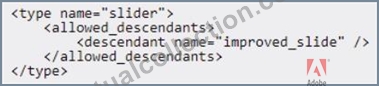
An Adobe Commerce developer has been asked to modify the PageBuilder slider content type to allow a new custom content type (other than slide) to be assigned as a child. The developer has already created the new content type called improved_slide in their module. They now need to create a new view/adminhtml
/pagebuilder/content_type/slider. xml file in their module to allow the new content type to be a child of slider content types.
What is the correct xml to accomplish this?
- A.

- B.

- C.
Answer: A
Explanation:
The correct answer is Option C. This XML configuration is the correct way to define allowed child content types for a slider content type in Magento's PageBuilder.
Magento PageBuilder Content Type Structure:
In PageBuilder, each content type can specify which other content types are allowed as children.
This is done by defining the allowed_children array within the content type's XML configuration.
Analyzing Option C:
Arguments Definition: Option C uses the <arguments> node to define a new argument named allowed_children.
Array Structure: This argument is an array (xsi:type="array") that includes an item specifying the improved_slide as an allowed child with xsi:type="string".
This configuration is correct because it explicitly defines which child content types are allowed for the slider content type, adhering to Magento's structure for allowed child elements in PageBuilder.
Why Options A and B are Incorrect:
Option A: Uses a <children> node with policy="allow", which is not the standard way to define allowed children for PageBuilder content types. This format is incorrect and won't be recognized by PageBuilder.
Option B: Uses <allowed_descendants>, which also doesn't align with the way Magento's PageBuilder expects child content types to be declared. The correct term is allowed_children, not allowed_descendants.
NEW QUESTION # 106
Which has its own root category?
- A. Stores
- B. Websites
- C. Store Views
Answer: A
Explanation:
In Magento, each store has its own root category. The root category acts as the top-level category under which all other categories and products are organized for that particular store. This structure allows for different catalog structures across multiple stores within a Magento installation, enabling a tailored product offering and navigation experience for each store. Theability to assign a unique root category to each store is a fundamental aspect of Magento's multi-store functionality, providing the flexibility to cater to diverse market segments or branding requirements.
NEW QUESTION # 107
An Adobe Commerce developer added a new API method to search and retrieve a list of Posts for a custom Blog functionality. This is the content of the module's etc/webapi.xml file:
The new code has been deployed to production and the merchant is using https: //merchant. domain. com
/swagger to review the new endpoint, but it is not visible in swagger.
What would be a reason for this?
- A. The webapi.xml file should be moved into the etc/webapi_rest/webapi.xml file.
- B. Since the new endpoint is not anonymous, the merchant needs to enter a valid integration token in swagger in order to see the new method.
- C. The greturn annotation is missing in the MyVendor\Blog\Api\PostRepositoryInterf ace class.
Answer: B
Explanation:
In Adobe Commerce, when defining new API endpoints through the webapi.xml configuration file, the visibility of these endpoints in tools likeSwagger(now OpenAPI) depends on several factors, including authentication settings. According to the provided webapi.xml file:
<?xml version="1.0"?>
<routes
xmlns:xsi="http://www.w3.org/2001/XMLSchema-instance"
xsi:noNamespaceSchemaLocation="urn:magento:module:Magento_Webapi:etc/webapi.xsd">
<route url="/V1/myvendor-blog/post/search" method="GET">
<service class="MyVendor\Blog\Api\PostRepositoryInterface" method="getList"/>
<resources>
<resource ref="MyVendor_Blog::Post_View"/>
</resources>
</route>
</routes>
* Option Asuggests moving the file to etc/webapi_rest/webapi.xml. However, this is incorrect because Adobe Commerce does not require separate XML files for REST and SOAP APIs in this context. The webapi.xml is used for defining routes for both. The structure and location provided in the question are correct for defining REST API routes.
* Option Bis the correct answer. The resource reference MyVendor_Blog::Post_View indicates that this API endpoint is not anonymous; it requires authentication. In Adobe Commerce, if an API endpoint requires authentication, it won't be visible in Swagger (or the OpenAPI UI) unless you provide valid authentication credentials or tokens. This is part of Magento's security model where protected resources require tokens or OAuth to access. For the merchant to see this endpoint in Swagger, they must provide an integration token or OAuth token which has permissions for MyVendor_Blog::Post_View. This is detailed in the Adobe Commerce Developer Documentation under[Web API Authentication](https://x.
com/i/grok?text=Web%20API%20Authentication).
* Option Cmentions the @return annotation missing in the interface class. While proper annotations in PHPDoc are important for IDE autocompletion and documentation generation, they are not directly related to the visibility of an endpoint in Swagger. The visibility in Swagger is determined by the configuration in webapi.xml and the authentication settings, not by PHPDoc annotations. Thus, this option is incorrect in the context of the question.
For further reading on how to manage and configure API endpoints in Adobe Commerce, including authentication, refer to the official Adobe Commerce Developer Guide:
* Web API Configuration
* Web API Authentication
* Swagger Integrationfor testing and documenting APIs.
This explanation covers the necessary aspects of Adobe Commerce API development, focusing on the configuration, authentication requirements, and how these affect the visibility of API endpoints in development tools like Swagger.
NEW QUESTION # 108
......
Validate your AD0-E724 Exam Preparation with AD0-E724 Practice Test: https://www.actualcollection.com/AD0-E724-exam-questions.html
Get all the Information About Adobe AD0-E724 Exam 2026 Practice Test Questions: https://drive.google.com/open?id=19tPbYd-AJNo23uEgK6VJ44CUWXZuLzHW